8.0 Introduction
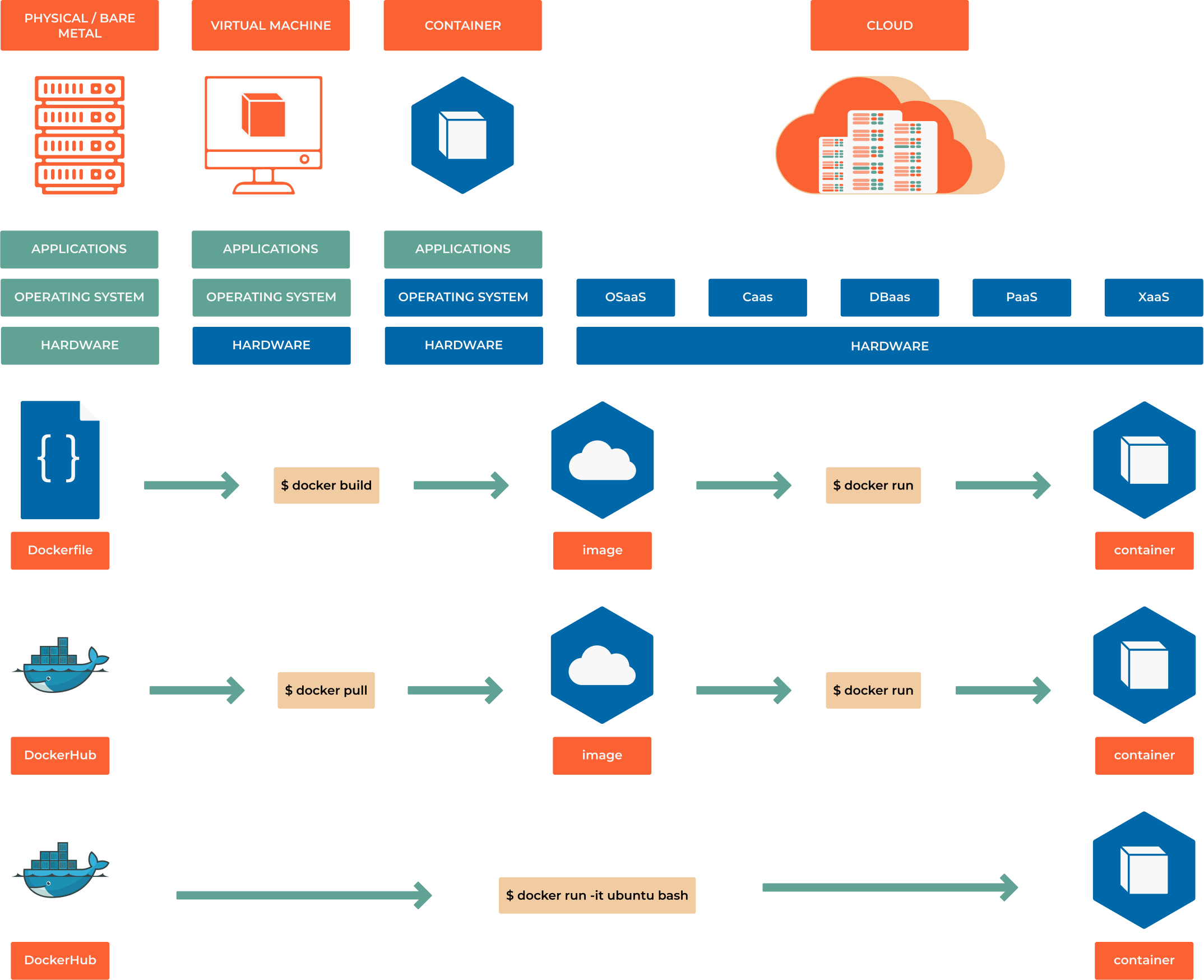
Imagine this scenario: Your team has built a Python web application that works perfectly on your laptop. But when you try to deploy it to the staging server, you get cryptic dependency errors. The production server runs a different Python version. Your colleague can’t even get it running locally because they’re missing a system library or some environments variables that you’ve added in a .env file. Sound familiar?
This is the classic “it works on my machine” problem that has plagued software teams for decades. Containers solve this fundamental challenge by packaging your application with everything it needs to run, creating a consistent experience from development to production.
Learning Objectives
By the end of this chapter, you will be able to:
Understand how containers revolutionize application deployment and eliminate environment inconsistencies
Build containerized applications using Docker and modern alternatives like Podman
Create production-ready Dockerfiles following security and performance best practices
Orchestrate multi-container applications using Docker Compose
Implement container security scanning and vulnerability management
Deploy containerized applications to production environments with confidence
Prerequisites: Basic understanding of command-line operations, software dependencies, and application deployment concepts.
The Container Revolution Explained
From Shipping to Software
The concept of containers isn’t new - the shipping industry revolutionized global trade in the 1950s by standardizing cargo containers. Before containers, loading a ship was a manual, time-consuming process with different packaging for every type of cargo. With standardized containers, any cargo could be efficiently loaded onto any ship, truck, or train.
Software containers bring this same standardization to application deployment. Instead of worrying about different operating systems, library versions, or system configurations, you package your application in a standardized container that runs identically everywhere.
The Problem Containers Solve:
Traditional application deployment faces several critical challenges:
Environment drift: Development, staging, and production environments gradually diverge
Dependency conflicts: Different applications require conflicting versions of the same library
Resource waste: Virtual machines consume significant overhead for simple applications
Scaling complexity: Adding new servers requires manual configuration and setup
Note
Why This Matters for DevOps: Containers are foundational to modern DevOps practices. They enable infrastructure as code, simplify CI/CD pipelines, and make microservices architectures practical. Understanding containers isn’t optional - it’s essential for modern software delivery.
Containers vs Virtual Machines
Understanding the difference between containers and virtual machines is crucial for grasping why containers have become the standard for modern application deployment:
Virtual Machines:
Include a complete operating system
Require significant CPU and memory overhead
Boot slowly (minutes)
Provide strong isolation through hardware virtualization
Ideal for running different operating systems or legacy applications
Containers:
Share the host operating system kernel
Minimal overhead (megabytes vs gigabytes)
Start instantly (milliseconds)
Provide process-level isolation
Perfect for microservices and cloud-native applications
Real-world impact: A single server that might run 5-10 virtual machines can easily run 50-100 containers, dramatically improving resource utilization and cost efficiency.
What is a Container?
A Simple Definition
A container is a lightweight, portable package that includes everything needed to run an application: code, runtime, system tools, libraries, and settings. Think of it as a “shipping box” for software that can be moved between different environments without breaking.
Technical Deep Dive:
At its core, a container is an isolated process (or group of processes) that runs on a shared operating system kernel. This isolation is achieved through Linux kernel features:
Namespaces: Provide process isolation (PID, network, filesystem, etc.)
Control Groups (cgroups): Limit and monitor resource usage (CPU, memory, I/O)
Union Filesystems: Enable efficient layered storage
Key Characteristics:
Portable: Runs consistently across different environments
Lightweight: Shares OS kernel, minimal overhead
Isolated: Applications can’t interfere with each other
Immutable: Container images don’t change once built
Ephemeral: Containers can be created and destroyed quickly
Container Platforms
Docker: The Pioneer
Docker popularized containerization and remains the most widely used platform:
Docker Engine: The runtime that creates and manages containers
Docker Hub: Cloud-based registry for sharing container images
Docker Desktop: Development environment for Mac and Windows
Docker Compose: Tool for defining multi-container applications
Podman: The Modern Alternative
Podman (Pod Manager) is a daemon-less container engine gaining popularity:
Daemon-less: No background service required, more secure
Rootless: Can run containers without root privileges
Pod support: Native support for Kubernetes-style pods
Docker compatibility: Drop-in replacement for most Docker commands
Container Runtime Landscape:
containerd: Industry-standard container runtime (used by Docker and Kubernetes)
CRI-O: Lightweight runtime specifically designed for Kubernetes
runc: Low-level runtime that actually creates and runs containers
Choosing the Right Platform:
Development: Docker Desktop for ease of use, Podman for security
Production: Kubernetes with containerd for scalability
Edge/IoT: Lightweight runtimes like containerd directly
Container Images Explained
Understanding the Layered Architecture
Container images use a layered filesystem that enables efficiency and reusability:
┌─────────────────────────────┐
│     Application Layer       │  ← Your code and app-specific files
├─────────────────────────────┤
│     Dependencies Layer      │  ← Python packages, Node modules, etc.
├─────────────────────────────┤
│     Runtime Layer           │  ← Python interpreter, Node.js, etc.
├─────────────────────────────┤
│     Base OS Layer           │  ← Ubuntu, Alpine, or minimal OS
└─────────────────────────────┘
Benefits of Layering:
Space efficiency: Common layers are shared between images
Fast builds: Only changed layers need to be rebuilt
Caching: Docker can reuse cached layers to speed up builds
Security: Base layers can be updated independently
Image Registries:
Container images are stored in registries:
Docker Hub: Public registry with millions of images
Amazon ECR: AWS-managed private registry
Google Container Registry: Google Cloud’s registry service
GitHub Container Registry: Integrated with GitHub repositories
Harbor: Open-source enterprise registry with security scanning
The Kubernetes Connection
From Containers to Orchestration
While containers solve the packaging problem, production applications need orchestration:
Pods: The Kubernetes Unit
Kubernetes introduces the concept of pods - the smallest deployable unit:
A pod contains one or more containers
Containers in a pod share networking and storage
Pods are ephemeral and can be created/destroyed dynamically
Think of pods as “wrapper” around your containers for orchestration
Why Pods Matter:
Co-location: Helper containers (sidecars) can run alongside your main application
Shared resources: Containers in a pod can communicate via localhost
Atomic operations: The entire pod is scheduled, started, and stopped together
Container → Pod → Service → Deployment
This hierarchy enables scalable, resilient applications:
# Example: A web application pod
apiVersion: v1
kind: Pod
metadata:
  name: web-app
spec:
  containers:
  - name: web-server
    image: nginx:1.21
    ports:
    - containerPort: 80
  - name: log-processor
    image: fluentd:latest
    # Sidecar container for log processing
Modern Use Cases
Microservices Architecture
Containers are perfectly suited for microservices:
Each service runs in its own container
Independent scaling and deployment
Technology diversity (different languages/frameworks)
Fault isolation
Cloud-Native Development
12-Factor App compliance: Containers naturally support cloud-native principles
CI/CD integration: Containers simplify build and deployment pipelines
Infrastructure as Code: Container definitions are code that can be versioned
Development Environment Standardization
Onboarding: New developers get consistent environments
Testing: Identical environments across test stages
Reproducibility: Bugs can be reproduced reliably
Legacy Application Modernization
Lift and shift: Containerize existing applications without rewriting
Gradual migration: Move components to containers incrementally
Dependency isolation: Solve compatibility issues between applications
Warning
Security Considerations: While containers provide isolation, they’re not a security panacea. Container security requires proper image scanning, runtime monitoring, and adherence to security best practices covered later in this chapter.
12 Factor App Principles
Codebase
What it says: One codebase tracked in version control, many deploys
Why it matters: A single authoritative source ensures every environment (dev, staging, prod) is running the same application—not divergent forks.
In practice: Keep one Git repo per service. Each deploy (prod, staging, feature branch preview) is just a different instance of that repo at a particular commit or tag.
Dependencies
What it says: Explicitly declare and isolate dependencies
Why it matters: Hidden global packages (“it works on my machine!”) cause brittle builds.
In practice: Use a manifest—package.json, requirements.txt, go.mod, etc.—and containerize or virtual-env so the runtime never reaches outside the declared list.
Config
What it says: Store config in the environment
Why it matters: Things that vary between deploys (DB URLs, API keys) shouldn’t live in code; that forces recompiles.
In practice: Inject values via environment variables or a secrets manager. Commit defaults or schemas, never real credentials.
Backing services
What it says: Treat backing services as attached resources
Why it matters: Databases, queues, and caches should be swappable without changing code.
In practice: Your app gets its Postgres connection string from DATABASE_URL; if you point it at RDS today and a local Docker container tomorrow, nothing else changes.
Build, release, run
What it says: Strictly separate build and run stages
Why it matters: Reproducible releases. A build artifact (container, JAR, wheel) is immutable; releases just bind config to that artifact, runs execute it.
In practice: A CI pipeline that (1) builds a Docker image, (2) tags it with a version, (3) deploys it by injecting env vars.
Processes
What it says: Execute the app as one or more stateless processes
Why it matters: Horizontal scaling becomes trivial when you don’t rely on local memory or sticky sessions.
In practice: Put session data in Redis, files in S3. Your API pods can be killed and replaced at will.
Port binding
What it says: Export services via port binding
Why it matters: The app is self-contained; it doesn’t require an external web server injected at deploy time.
In practice: A Go binary that listens on $PORT—whether it’s wrapped by Kubernetes, Heroku, or systemd is infrastructure’s concern, not the app’s.
Concurrency
What it says: Scale out via the process model
Why it matters: Different workloads need different process types/quantities—HTTP, workers, schedulers.
In practice: In Procfile-style platforms you might run web=4, worker=8, scheduler=1, each as separate process classes.
Disposability
What it says: Maximize robustness with fast startup and graceful shutdown
Why it matters: Rapid restarts make deployments and failures less disruptive; graceful shutdown prevents lost work.
In practice: Aim for <1s boot, trap SIGTERM to finish in-flight requests, and acknowledge queue jobs only after success.
Dev/prod parity
What it says: Keep development, staging, and production as similar as possible
Why it matters: The bigger the gap, the more “works locally” surprises.
In practice: Use Docker Compose or Tilt to mimic prod containers locally; deploy multiple times per day so code isn’t long-lived on a laptop.
Logs
What it says: Treat logs as event streams
Why it matters: The app shouldn’t worry about log files, rotation, or archival.
In practice: Write to STDOUT/STDERR. Let the platform (CloudWatch, Loki, ELK) aggregate, index, and retain.
Admin processes
What it says: Run admin/management tasks as one-off processes
Why it matters: Database migrations or data backfills need the same code + config as the main app, but shouldn’t be part of the long-running service.
In practice: heroku run python manage.py migrate or a Kubernetes Job that mounts the same container image and environment but exits when finished.